🛠️ Operation Description
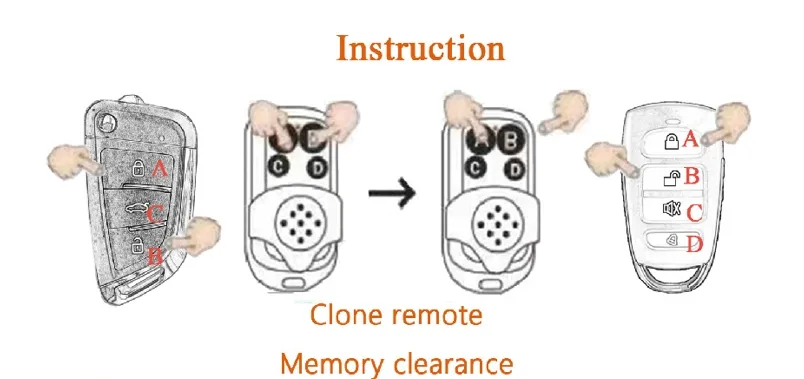
Step 1
Press button "A" and "B" at the same time. When the LED flashes and turns off, then click "B" button for 3 times (meanwhile "A" key still holding on all the time). When the LED flashes, the memory code is erased.
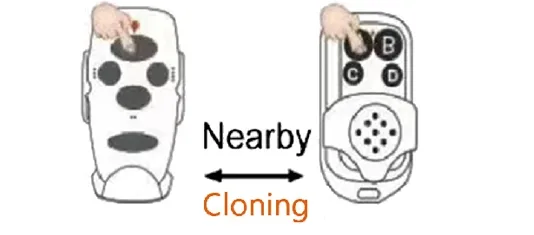
Step 2
Press the 2 buttons of the original & clone remotes, which need to be placed nearby. Press the 2 buttons at the same time, when the LED indicators flash all the time, then release them.
💡 Tip:
Press the cloned-button on the clone remote. If the LED indicator turns on all the time, that means that the code is cloned successfully. Clone the other codes from the original remote by following the steps.
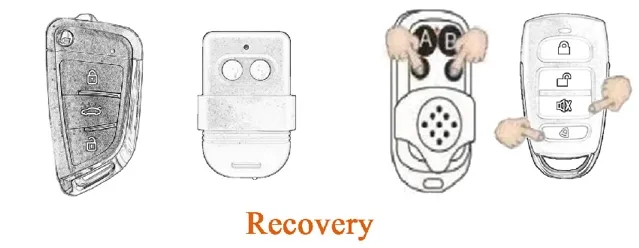
Recovery: If erase the code by mistakes, don't worry we can recover it by pressing the button C & D at the same time for a bit long time. When the LED flashes, the codes are recovered.
❓ Frequently Asked Questions
What is the operating frequency of this remote?
The remote operates at a stable frequency of 433MHz, suitable for most garage and gate systems.
How far can the signal reach?
The transmission distance is between 50 to 100 meters, depending on environmental obstacles.
What should I do if I accidentally delete the programmed codes?
You can recover the erased codes by pressing the C and D buttons simultaneously for a few seconds until the LED flashes.
How do I know if the memory is cleared correctly?
When clearing (Step 1), the LED will flash and turn off. Once successfully erased, pressing any button will result in the LED flashing briefly or not staying on.
What type of battery does this remote use?
The remote operates on a 3V power supply, providing long-lasting usage for daily gate operations.
Is this remote compatible with rolling codes?
This specific model is designed for Fixed Code cloning. Please ensure your original remote is a fixed code type.